Last checked . Picks are based on the prices, rates, fees and terms each provider publishes, checked at the source. We never rank products by commission. See how we’re funded.
Facebook’s complicated privacy settings are something you can complain about. While there are options and settings available to you, that doesn’t mean that they will be easy to find. The social media giant says privacy-related settings are available, but where exactly? Well, you’re going to learn how to change your Facebook settings so you can opt-out of platform API sharing.
Facebook has allowed third parties to gain access to your personal data that’s not being properly protected, thus violating your right to protection and privacy, such as the whole Cambridge Analytica scandal. Legislators and regulators are scrambling to come up with policies to better control how personal data is handled, such as putting limitations in place.
You could always choose to leave Facebook altogether, but not everyone can or will do that for one reason or another. For now though, if you’re interested in continuing to use Facebook and want to opt-out of platform API sharing, you can do so in your privacy settings. It’s worth noting that this will disable all platforms apps, such as Twitter and Instagram. You will not be able to log into other sites using your Facebook login information.
How to Opt-Out of Platform API Sharing
- Log into your Facebook, then head over to App Settings page (you can also get there via the Settings Menu > Apps)
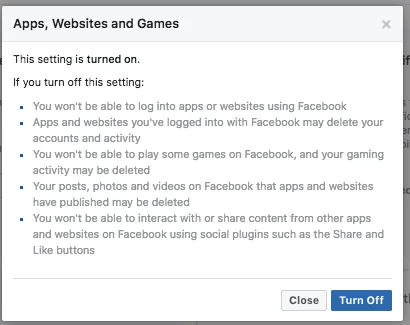
- Once you’re there, click the “EDIT” button under the “Apps, Websites and Games” option. Then click “TURN OFF.”
Here’s how you can opt-out via visual screenshots:
STEP 1: SCREENSHOT
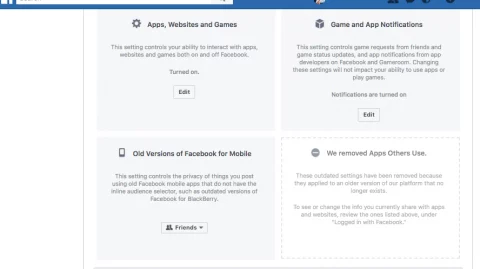
STEP 2: SCREENSHOT